
The Sensverk dashboard
See where your site's energy goes, and what to do about it.
Sensverk reads your BMS, meters and DCIM and shows energy, savings, compliance evidence and early alerts in one dashboard. Its agents observe and recommend. Your team decides.


Three problems, one dashboard.
- Less cooling
Sensverk finds the cooling you don't need, proposes safe setpoints and checks the saving against your baseline. You see what each change actually saved, not what it was expected to save.
- The cause
When cooling or power starts to drift, you see the likely cause and the fix early. Sensverk links your BMS, meters, UPS and DCIM, so a fault in one system is traced to its source in another.
- The evidence
Each reported figure carries its meter, timestamp and method. Gaps show before the deadline, with the next step to close each one.
Four views of the same site.
Every view reads from one model of your site, so a number in one view matches the same number in the others.
-
01 · PUE & Energy
Know your PUE right now, and where it's heading.
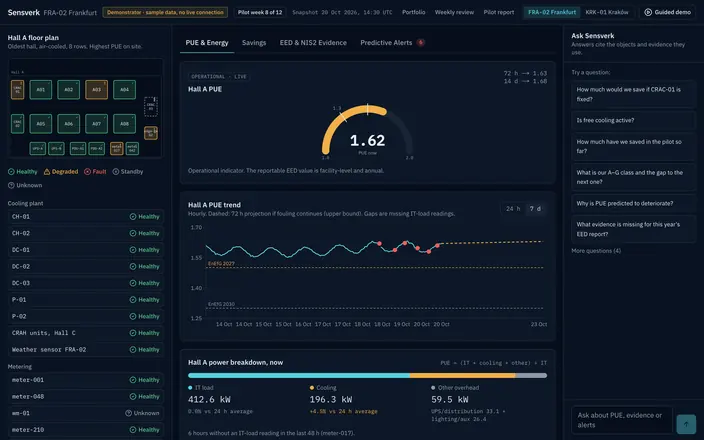
Live PUE per hall, with the trend and a short-term projection. The power breakdown shows how much goes to IT, cooling and everything else.
- You see current PUE per hall, its 24-hour and 7-day trend, and a 72-hour projection.
- You see the PUE thresholds that apply to your site on the same chart.
- You see which plant is healthy, degraded or faulty on a floor plan, and which meter readings are missing.

-
02 · Savings
Every saving measured, not just promised.
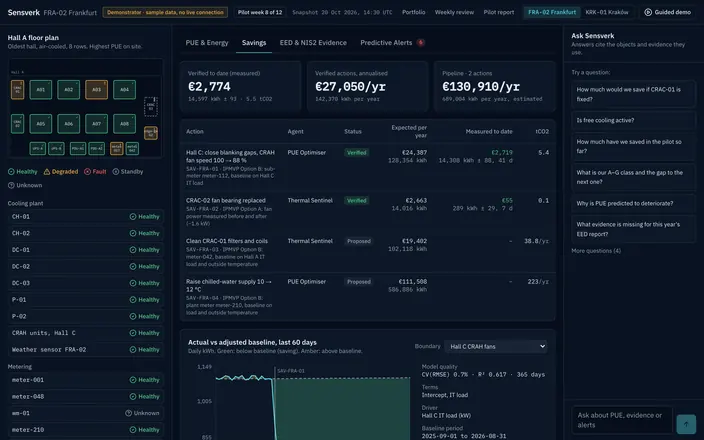
Each action shows its expected saving and what it has measured so far against an adjusted baseline.
- You see measured savings to date, verified savings per year, and the actions still waiting for approval.
- You see each action with the agent that proposed it, its status, kWh, euros and tCO₂.
- You see actual use against the baseline, with the method and the model's quality stated.
-
03 · EED & NIS2 Evidence
Know which controls hold up, and which don't yet.
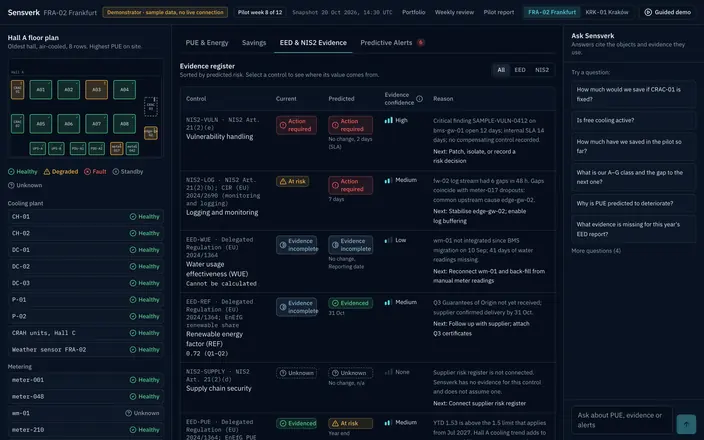
An evidence register lists your EED and NIS2 controls, their status today and their predicted status at the reporting date.
- You see each control as evidenced, at risk, incomplete, action required or unknown. Unknown stays unknown.
- You see how confident the evidence is, why, and the next step to close the gap.
- You click a control to see where its value comes from.
-
04 · Predictive Alerts
Problems found before they cost you.
An alert explains what is changing, what it costs and what is likely causing it, then offers options to choose from.
- You see the likely root cause, the equipment involved and the expected saving from fixing it.
- You see remediation options with risk, effort and who has to approve them.
- You follow each alert from open to approved, carried out and verified, or marked not effective.
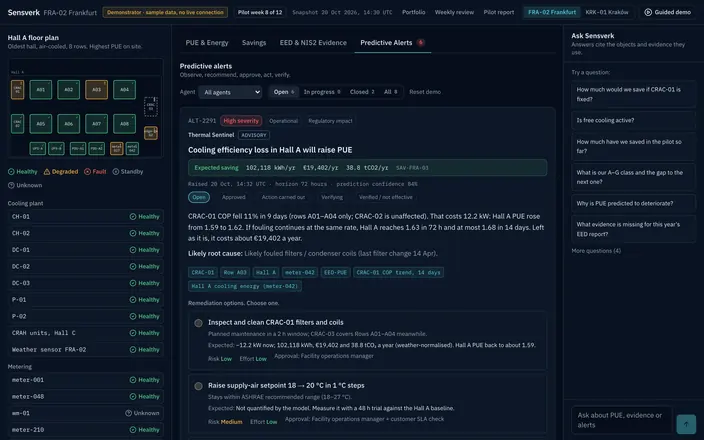


Ask a question in plain language, such as “Why is PUE predicted to rise?” or “What evidence is missing for this year's EED report?” Answers cite the equipment and the evidence they use.
Connect, see, approve.
- 01
Connect read-only
Sensverk connects to the BMS, meters, UPS, DCIM and sensors you already run. It reads data and changes nothing.
Read-only
Quick to start: most sites connect in days, not months
- 02
See one picture
Sensverk builds one model of your site and its agents watch energy, evidence and drift from normal.
- 03
Approve, then verify
Agents recommend. Your team approves, makes the change in its own BMS, and Sensverk checks whether it worked.
You stay in control
It reads.
It doesn't touch.
What Sensverk reads
- Data from your BMS, energy meters, UPS and PDUs, historian or SCADA, DCIM and IoT sensors.
- Only what it needs to model energy, cooling, power and evidence.
- Every figure it shows keeps its source, its time and how confident Sensverk is in it.
What Sensverk never does
- It never changes a setpoint or switches equipment. Access is read-only.
- It never acts without your approval. Your engineers make every change in your own BMS.
- It never fills in missing evidence. A value it can't prove stays marked unknown.


Want to see it on your site's data?
Talk to Brian.
Bring your energy bill, your last EED report and the alarm nobody could explain. I'll walk you through what Sensverk would show for your site, and we'll decide together whether it's worth a closer look.
Brian Stout, CEO
I reply within two working days.